


Hobby Lobby Stores
3.33.34K Reviews
App Specs
- Version
- 3.0.19
- Updated On
- License
- Free
- Downloads
- 5,000,000+
- Developer
- Hobby Lobby Stores, Inc.
- Categories
- Lifestyle
- Platform
- Android, iOS
Screenshots
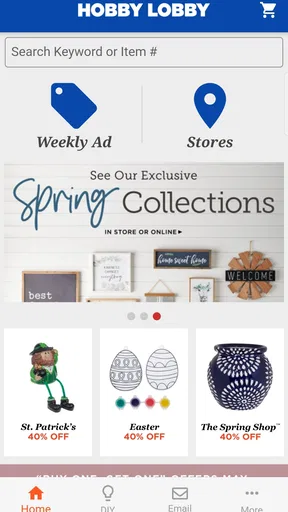
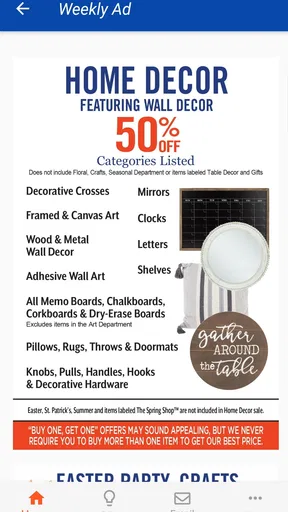
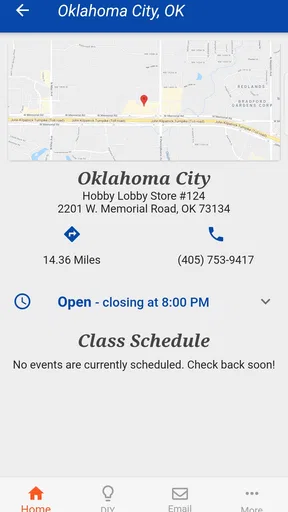
 Analysis by AppCompare
I approached Hobby Lobby Stores as a practical shopping companion rather than a full creative-planning tool. That distinction matters. The app is aimed at people who already shop at Hobby Lobby and want the store experience available on a phone, whether they are checking products before leaving home, browsing ideas, or trying to make a more organized visit. It is a free lifestyle app from Hobby Lobby Stores, Inc., available to everyone, and its main value comes from keeping the retailer close at hand instead of making you open a browser every time.
After using it, my impression is fairly straightforward: it is useful when your plans already involve Hobby Lobby, but it is not something I would install expecting a complete craft-management system. The app feels most comfortable as a repeat-visit tool. You open it with a specific purpose, look through the available shopping information, and then move on to the project itself. That focused role is also its main limitation, because people who want broad marketplace comparisons, detailed project organization, or a highly polished shopping dashboard may find a general retail app more flexible.
How I use it before and during a Hobby Lobby trip
My basic workflow starts before I enter a store. I first decide what kind of visit I am making: a planned project run, a quick search for inspiration, or a general browse. That small decision prevents the app from becoming a distraction. For a planned project, I keep the materials in a short note on my phone, then use the app to explore the relevant Hobby Lobby selection. I do not rely on memory alone, especially for projects that need several sizes, colors, or related supplies.
The app is particularly convenient when I am already thinking in Hobby Lobby categories. A person looking for craft materials, home décor, seasonal items, fabric, or party supplies can use it as the first stop in the process. I can browse from the sofa, narrow my idea mentally, and then decide whether the trip is worth making. That is more useful than wandering through a large store without a plan, even though the app itself does not replace physically checking an item.
One habit I found helpful is separating “research” from “purchase.” During the first pass, I look for the kind of item I need and note the details that will affect my project, such as color family, size, finish, or quantity. During the second pass, I decide what is essential and what is merely tempting. This is a simple routine, but it suits a store with a broad assortment, where browsing can quickly turn into an unplanned basket.
For a realistic everyday example, imagine that I want to refresh a small room with a framed print, a vase, and a few decorative accents. Instead of visiting immediately, I open the app while measuring the available space. I browse with those measurements in mind, compare the visual direction of several items, and make a short list. On the eventual store visit, I can concentrate on checking the pieces in person rather than starting the entire search from zero.
The strongest use case is preparation, not prolonged in-store management. If you want a calm way to decide what to look for before driving to Hobby Lobby, the app makes sense. If you expect a complete live shopping assistant that handles every part of a project, your expectations should be lower.
Worth Reading Before You Choose

EA SPORTS FC Mobile 26 Is a Bigger Football Game, but It Takes Time

Flipboard Shows What News Apps Must Do Beyond the Feed

Switching to Android Auto Means Rethinking Your Driving Routine

Google Calendar Makes a Crowded Week Easier to Manage

Ludo King Makes the Most of the Minutes Between Plans

Baby Panda World Brings Quick Play to Modern Phones, but Its Game Library Feels Busy
What the app does well for repeat shoppers
Its biggest strength is familiarity. Once I know that I am shopping at Hobby Lobby, I do not need to begin with a broad web search that mixes several retailers. The app keeps my attention on one store’s assortment and presentation. That makes it especially handy for people who regularly buy supplies there and already understand how the store’s departments fit their hobbies.
I also like the app for idea gathering. Not every visit begins with a precise product name. Sometimes I know the result I want—a warmer table setting, a handmade gift, a seasonal display—but not the exact materials. Browsing can help me move from a vague idea to a more concrete shopping plan. The important point is to treat those ideas as a starting point, not as a guarantee that every pictured or displayed item will be available when I arrive.
The app’s free price removes the main barrier to trying it, and its Everyone content rating makes it suitable for ordinary household use. It has been available since November 9, 2012, so this is not a brand-new experiment from the retailer. The current version is 3.0.19, with a minimum operating system requirement of 8.1. On a compatible phone, installation is an easy decision if Hobby Lobby is already part of your shopping routine.
There is also a practical advantage for households where several people contribute to one project. I can browse first, share the idea verbally or by showing the screen, and then make a clearer decision about what to buy. That is less formal than a dedicated project board, but it works well for a weekend craft, a classroom decoration, or a small home update where the shopping list remains manageable.
Settings and small habits worth checking
I would not install the app and immediately start tapping through every section. I first check the phone’s app settings and the app’s available preferences, especially anything related to notifications or location. The right choice depends on how I shop. Someone who wants occasional reminders may welcome them, while someone who only opens the app for planned research may prefer a quieter setup.
Location-related options deserve a deliberate decision. A store-focused app can be more useful when it knows which local branch matters, but I do not want location behavior enabled casually on every device. I review the permission when it appears, decide whether the convenience is worth it, and remember that I can change the choice later in the phone settings. This is a better habit than accepting every prompt without reading it.
I also keep a little space between app browsing and final purchase decisions. Retail information can change, and a product that looks right on a screen may feel different in person. For fabric, décor, paint-related accessories, or anything where texture and color matter, I use the app to shortlist options and the store visit to verify the physical result. That two-step approach avoids a common mistake: treating a digital image as a perfect substitute for handling an item.
Another useful setting is not inside the app at all: I adjust my phone’s display brightness and text size before doing a longer browse. This sounds minor, but it makes product details easier to inspect in different lighting. I also avoid browsing with a nearly empty battery before a store visit. The app is only helpful if the phone remains usable when I need to check my notes or revisit an item.
I would not expect the app to replace a dedicated note-taking application. For repeatable projects, I keep the actual measurements, quantities, and alternatives in a separate note. Then I use Hobby Lobby Stores for the retailer-specific part of the process. This division is efficient: the note remembers my plan, while the shopping app helps me explore the store’s options.
Faster patterns for planned shopping
Experienced use comes from repeating a few simple patterns. My favorite is the “three-pass” browse. First, I search or explore broadly enough to understand the available direction. Second, I remove items that do not fit the budget, dimensions, or project style. Third, I return only to the realistic choices. Without that final filtering pass, a large craft and décor assortment can make every option seem necessary.
For seasonal shopping, I start earlier than I think I need to. The app is useful for forming a visual plan before I am under time pressure. I can decide whether I am looking for a complete theme or only one accent, then avoid buying unrelated pieces simply because they appear alongside the original idea. This is especially helpful for decorations, party details, and gift-making supplies, where small extras can multiply quickly.
For craft projects, I use a “core item plus substitutes” approach. I identify the one material that determines whether the project works, then choose two acceptable alternatives for supporting items. If the exact ribbon, frame, embellishment, or color is not suitable in person, I already have a fallback direction. This makes the store visit less frustrating than arriving with a rigid list that depends on one perfect product.
Another efficient pattern is to browse with a finished result in mind rather than a department in mind. Instead of opening the app simply to look at “crafts,” I ask what I am trying to make: a centerpiece, a gift package, a wall arrangement, or a child’s activity. That question narrows my attention and helps me judge whether an item solves a problem or merely looks attractive on its own.
I also recommend taking a screenshot or writing down the key details of a promising item before leaving the app. I do not use that as proof of current availability; I use it as a memory aid. It is easy to forget why an item caught my attention after viewing many similar products. A quick reference helps me compare the original idea with what I actually see in the store.
These habits make the app feel faster without pretending it has shortcuts that are not there. The speed comes from how I organize the visit, not from hidden automation. That is an important distinction for anyone expecting the app to build a complete project list automatically.
Where the experience reaches its limits
The average rating is 3.3 from around fifteen thousand ratings, with roughly three thousand three hundred written reviews. I see that middle-ground reception as a useful warning rather than a reason to dismiss the app. It suggests that the experience works for some shopping routines but may not feel equally smooth or complete for every user. My own view is similar: the concept is practical, while the usefulness depends heavily on whether Hobby Lobby is already the store I intend to use.
The app has passed five million installs, which shows that it serves a substantial audience, but popularity does not turn it into a universal shopping solution. I would skip it if I rarely shop at Hobby Lobby, if I mainly compare several retailers at once, or if my priority is a sophisticated inventory system. A general shopping browser may be better for cross-store price research, while a notes or project-management app is better for tracking measurements and task order.
I would also avoid depending on it as the only source of truth during a time-sensitive project. For a birthday setup happening that afternoon or a class activity with no spare materials, I would prepare alternatives and contact the store through the appropriate channel if certainty matters. The app can help me plan, but planning and guaranteed local availability are not the same thing.
There is a trade-off between inspiration and control. Browsing a retailer’s selection is enjoyable when I want ideas, but it can encourage impulse purchases and make a simple project feel larger. People working with a strict budget should decide the project limit before opening the app. I find it useful to separate “must have,” “nice to have,” and “only if the total remains comfortable.” That small classification protects the practical value of the tool.
Another limit is that the app’s usefulness is tied to the retailer’s ecosystem. It does not become a neutral craft adviser simply because it contains many categories. If I need technical guidance, material compatibility advice, or a comparison of brands from different stores, I look elsewhere and use the app only for the Hobby Lobby portion of the decision.
Who should install it, and who should pass
I recommend it to regular Hobby Lobby customers, occasional shoppers preparing a specific project, parents looking for craft ideas, and home decorators who prefer to browse before visiting a physical store. It is also a reasonable choice for anyone who wants a free way to keep the retailer’s shopping experience available on a compatible phone.
I would be more cautious for professional makers who need precise stock control, detailed supplier comparisons, or a reliable purchasing workflow across multiple retailers. The same applies to shoppers who expect advanced wish lists, robust project boards, or a highly personalized catalog. In those cases, I would pair the app with a separate organizational tool—or choose a broader shopping platform as the main solution.
For families, the app can be useful when one person does the planning and another does the shopping. The planner can narrow the visual direction, while the shopper uses the result as a reference in the store. Still, I would keep the final list concise. Passing along dozens of possible items creates confusion; passing along a few preferred choices and acceptable substitutes works much better.
It is also worth remembering that the app is categorized as Lifestyle rather than as a dedicated education, design, or project-management product. That matches my experience. It supports the shopping side of creative activities, but it does not teach a complete technique or manage an entire project from concept to completion.
My verdict after building a repeatable routine
Hobby Lobby Stores is best understood as a retailer companion with a creative-shopping focus. I like it when I have a clear reason to visit Hobby Lobby and want to browse first, organize my thoughts, and reduce aimless time in the aisles. Its free access, broad everyday usefulness, and straightforward role make it worth trying for regular customers.
My recommendation comes with a condition: use it as one part of a workflow. Keep measurements and quantities in a note, check permissions thoughtfully, browse in passes, prepare substitutes, and verify important details in person. Those habits turn a basic shopping app into a more dependable tool without asking it to do work it was not designed to do.
In the end, I would install it if Hobby Lobby is already my preferred destination for crafts, décor, fabric, or seasonal projects. I would not install it merely because I want a general lifestyle app or a complete creative organizer. Its real strength is helping me arrive with a better plan; its real weakness is that the plan still needs my judgment. That balance makes it useful, but only when I treat it as a focused companion rather than the entire project.
Pros
- Wide range of craft
- home décor
- fabric
- and seasonal products.
- Frequent coupons and weekly sales can offer significant savings.
- Store pickup helps customers avoid shipping fees and delays.
- Useful choice for DIY projects
- party supplies
- and holiday decorating.
- Product categories make browsing for specific craft materials simple.
Cons
- Coupons may exclude certain brands
- products
- or sale items.
- Some popular items can sell out quickly
- especially during holidays.
- Store hours and pickup availability vary by location.
- The app may require location access for accurate store information.
- Large seasonal sections can make finding everyday items less convenient.
FAQs for Hobby Lobby Stores
What is the Hobby Lobby Stores app used for?
The Hobby Lobby Stores app is designed to help shoppers browse arts, crafts, home décor, fabric, seasonal merchandise, and other products from Hobby Lobby. From the app, you can search categories, view product details, check current promotions, save items, and place orders for delivery or eligible store pickup. It is especially useful when planning craft projects or comparing products before visiting a store.
Can I check whether an item is available at my local Hobby Lobby store?
In many cases, the app allows you to select a nearby Hobby Lobby location and review product availability or pickup options for eligible items. Inventory can change quickly, particularly during holiday seasons, sales, and popular craft trends, so availability shown in the app should be treated as an estimate rather than a guarantee. Calling the store may be helpful for time-sensitive purchases.
Does the Hobby Lobby app offer coupons, sales, or special deals?
The app can make it easier to find Hobby Lobby promotions, sale categories, seasonal offers, and other savings opportunities available through the retailer. Discounts and coupon policies may change, and some products or departments can be excluded. Before completing a purchase, review the terms shown in the app carefully, including expiration dates, eligible items, and whether an offer applies online, in stores, or both.
Can I place orders through the Hobby Lobby Stores app?
Yes, the app may allow you to add products to a shopping cart and complete an online order, depending on your location and the item selected. You can typically review pricing, shipping information, and available fulfillment methods before payment. Some merchandise may have different delivery restrictions, processing times, or pickup eligibility, so check the product page and checkout details before confirming your order.
Is the Hobby Lobby Stores app free to download and use?
The Hobby Lobby Stores app is generally free to download, and browsing products, viewing store information, and checking promotions should not require a separate subscription. However, normal internet or mobile data charges may apply, and you will still pay for any products, delivery fees, taxes, or other charges associated with an order. Availability and supported features can vary by device and region.


